For people who live in meetings

Your meetings already happened. The follow-up shouldn't take an hour.

Record a meeting right in MeetScribe, or drop in a recording — it transcribes on your own computer, offline, and files the transcript in one library alongside the transcripts you export from Fathom, Otter, Fireflies, and Zoom. Then it pulls out every action item with its owner and due date, plus every decision — and keeps track of who owes what.

First 5 meetings free. No account, no subscription for the core tool. One short speech-model download the first time you transcribe — after that, fully offline.

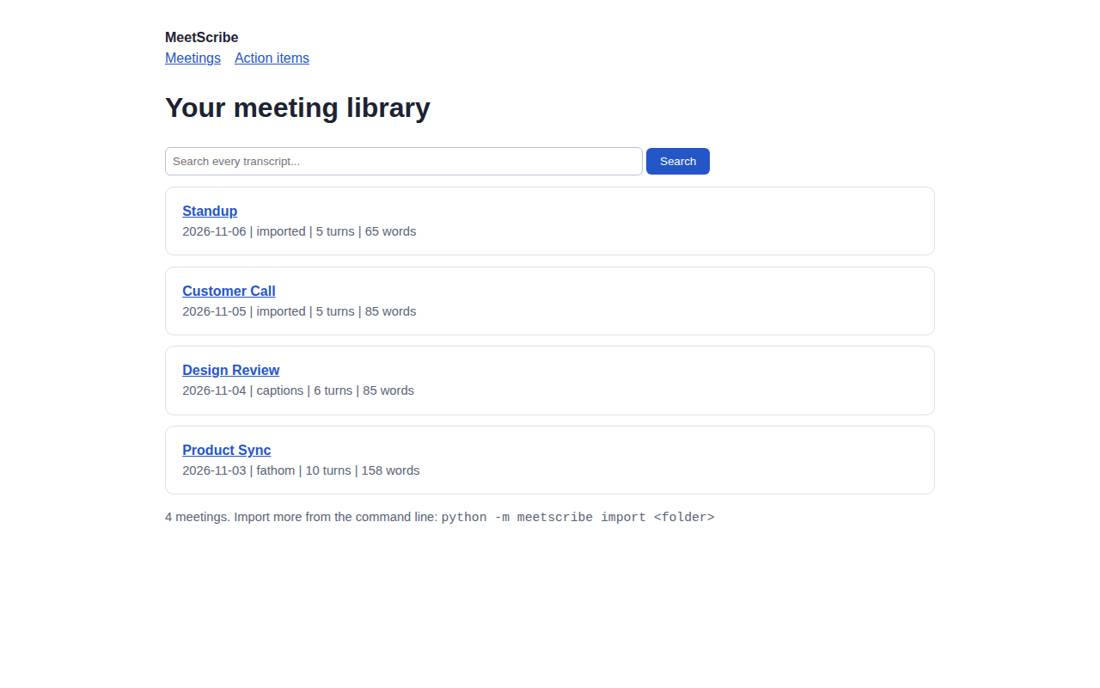
MeetScribe app — your meeting library, with one search box over every meeting
The actual app, running on the sample meetings: your library, one search box, every meeting in one place.
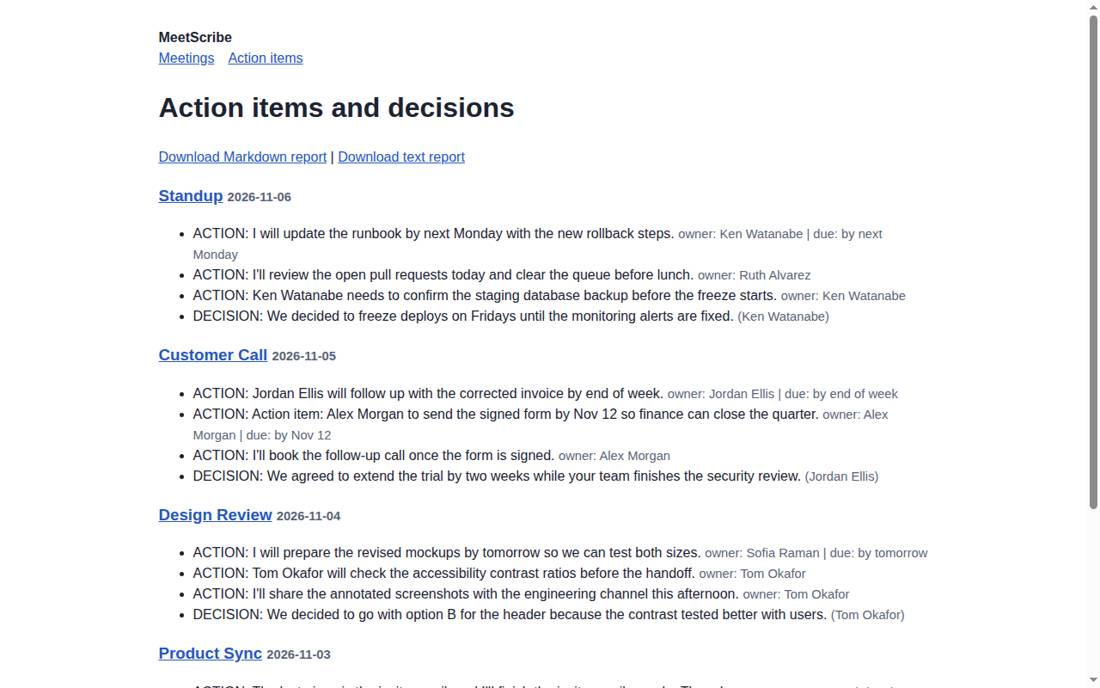
MeetScribe action items and decisions page, with owners and due dates
And the page that matters: every action item and decision, with owners and due dates, downloadable as a report.
14action items found in the sample meetings
6decisions pulled out alongside them
99automated tests passing
0uploads — your recordings and transcripts never leave your machine

Cancel your notetakers. Keep everything.

Meeting tools rent your history back to you, one month at a time. Stop paying, and the record of what was said — and what was promised — goes with the subscription.

MeetScribe is the opposite arrangement. Your recordings, your transcripts, your library: one file on your own computer, yours permanently, bought once. Bring everything you already have, from every tool you've ever used, and it stays findable whether or not you ever pay anyone another monthly fee.

What you get: a sample

This is real output from the sample meetings that come with MeetScribe — not a mock-up. Across the 4 sample meetings, MeetScribe found 14 action items and 6 decisions. Here is one whole meeting's worth, exactly as the report reads:

Sample output

Product Sync

Tuesday, November 3, 2026 · Recorded on Fathom · Dana Whitfield, Marcus Lee, and Priya Nair

Action items

  • “The last piece is the invite email, and I'll finish the invite email copy by Thursday.”

    Marcus Lee · Due Thursday, November 5, 2026

  • “Marcus Lee will draft the pricing page by 2026-11-10 so it is ready before the announcement.”

    Marcus Lee · Due November 10, 2026

  • “Priya Nair to confirm the venue booking for the December demo day.”

    Priya Nair · No due date was mentioned

  • “I will update the roadmap document once the pricing page is drafted.”

    Marcus Lee · No due date was mentioned

  • “Dana Whitfield to send the beta invite list by Friday.”

    Dana Whitfield · Due Friday, November 6, 2026

Decisions

  • “On pricing, we decided to launch the beta at the current price and revisit it in January.”

  • “We agreed to drop the legacy export format in the next release.”

  • “Last thing, we are going with the shorter onboarding checklist for the beta cohort.”

Every item quotes the exact sentence from the transcript, so you can check it in context. Relative dates like “by Friday” are worked out against the meeting date. This meeting alone: 5 action items, 3 decisions.

Get MeetScribe — $29 one-time

The trial covers your first 5 meetings free — recorded, transcribed, or imported — run your own meetings through it and see your own list.

Who it's for

Your meetings pile up in every shape: a recording on your phone, an MP4 from a call, a Fathom export here, an Otter text file there. And the two things you actually needed from each one — who owes what, and what got decided — sit buried in the middle of page three, if a transcript exists at all.

MeetScribe is for anyone who lives in meetings and wants that pile in one place they own: searchable, deduplicated, transcribed when there's no transcript yet, and summarized into the parts that matter — action items and decisions.

How it works

Three ways in, one library, about five minutes the first time.

  1. Record it, or bring what you have

    Record from your microphone inside MeetScribe, or drop in an audio or video recording — MP3, WAV, M4A, MP4, FLAC, WebM. MeetScribe transcribes it offline, on your machine. Already have transcripts? Export them from Fathom, Otter, Fireflies or Zoom — TXT, VTT, SRT or JSON, any mix. The free guides below walk through each one.

  2. It all lands in one library

    Drop in a whole folder — MeetScribe processes it on your machine, transcribes any recordings it finds, detects duplicates so nothing doubles up, and builds one searchable library on your machine.

  3. Ask it questions — and work the list

    Search by word, speaker, date or source. Or open the commitments register and get every promise across every meeting, split into what you owe and what you're waiting on.

What it does

One library for every meeting you have, in whatever shape it arrives — and the follow-up list writes itself.

Record and transcribe, offline

Record from your microphone, or give MeetScribe a recording file, and it transcribes with a local speech model on your own computer. No cloud transcription service, no uploads — the recording never leaves your machine.

Action items, with owners and due dates

The whole point. "I'll send that Friday" becomes a line in a report: who, what, and the actual calendar date — across all your meetings at once, not buried in one transcript.

Decisions, on the record

Every "let's go with…" and "we decided…" pulled into one list, so "wait, when did we agree to that?" has an answer.

Search across everything

One search box over every meeting in the library — transcribed or imported — with speaker, date and source filters, instead of hunting app by app.

Bulk export

The whole library, or any part of it, out to clean Markdown or text files — for your notes, your docs, or feeding into any other tool.

Duplicates caught for you

Re-import the same folder next week and it skips what it already has. Your library stays clean as it grows.

Private by design

MeetScribe runs locally and offline on your own computer. There are no hosted accounts and no uploads — your recordings and transcripts stay with you.

Every promise, tracked: the commitments register

Extracting action items is where other tools stop. This is where follow-through starts.

Every action item from every meeting flows into one list, split the way you actually think about it: what you owe, and what you're waiting on. Delegation runs in both directions — a flat per-meeting list can't tell them apart. The register can.

The exact words, as proof

Every commitment carries the verbatim sentence from the transcript, with the meeting and the date one step away. When someone says "I never agreed to that," the words are right there.

Nothing tracked without your say-so

New items wait in a confirm queue. You approve each one as-is, fix the owner or due date, edit the wording, or drop it. A sentence that was never really a promise dies in the queue instead of becoming a false obligation — and only you ever change a status.

Overdue and due this week

Dedicated views surface what's late and what's coming up, and undated items get their own triage list instead of quietly vanishing. Due commitments also export to a standard calendar (.ics) file, so the dates live where you already look.

Follow-ups, already drafted

When it's time to chase, MeetScribe drafts the message for you — a first assignment, a gentle nudge, or an overdue reminder — quoting the commitment, its due date, and the proof sentence. You copy it, check it, and send it from your own mail. MeetScribe never sends anything itself.

The honest limits

MeetScribe works from words and patterns, not minds. It catches commitments phrased the way people usually phrase them — "I'll send that by Friday," "Sarah will book the room" — and it will miss vague ones like "we should probably look into that sometime." Every item it finds quotes the full sentence, so you can check it in context, and it never invents one that isn't in the text.

Transcription has its own limits, stated plainly. The speech model doesn't identify who is speaking, so recordings come in without speaker labels — items that name a person still get that person as owner, but a bare "I will…" from a recording stays unassigned rather than guessed at. And accuracy depends on the audio: clear recordings in a quiet room do best; crosstalk, distant microphones, and names can come out wrong. Read the transcript before you rely on it.

Two practical notes. Recording and transcription use two optional packages listed in an included requirements file (a one-line install), plus the free ffmpeg program for non-WAV recordings. And the first time you transcribe, MeetScribe downloads its speech model once — about 75 MB for the default — tells you the size and destination first, and never touches the network for transcription again.

Pricing

The core tool is sold outright. You buy it, you own it.

Pro

$9 / month

  • Everything in the core tool
  • Adds automatic Fathom sync — new meetings land in your library on their own, no exporting by hand
  • Pro is built (v1.1.0 and later) and available now
  • Cancel any time
Get Pro
Free trial

$0 first 5 meetings

  • Download MeetScribe from this site
  • Your first 5 meetings are free — record, transcribe or import
  • Buy a license key any time to remove the limit
Try it free

MeetScribe is live. Pro is separate and optional — the core tool above is available now for $29 one-time.

Free guides

Useful even if you never buy anything. Each one solves the problem by hand first, then shows the tool way.

Questions

Do I need to create an account?

No account. Buy it, install it, use it. MeetScribe runs on your machine — there's nothing to sign into.

Does MeetScribe run online?

No. Recording, transcription, import, search, actions, decisions, the commitments register and export all work offline, on your own computer. There are no hosted accounts and nothing is uploaded. The only downloads are the program itself and a one-time speech-model download (about 75 MB) the first time you transcribe — MeetScribe tells you the size and destination before it starts.

Can it transcribe a recording I already have?

Yes — that's built in. Give it an audio or video file (MP3, WAV, M4A, MP4, FLAC, OGG, WebM) and it transcribes it offline with a local speech model, then treats it like any other meeting: searchable, exportable, and mined for action items and decisions. You can also record straight from your microphone inside the tool.

Does transcription label who is speaking?

No — the model doesn't identify speakers, and MeetScribe won't guess. A transcribed recording comes in as one voice stream. Sentences that name a person ("Marcus will draft…") still get that person as the owner; a bare "I will…" stays unassigned for you to confirm in the register.

What do I need for recording and transcription?

Two optional packages listed in the included requirements file — one install command — plus the free ffmpeg program if you'll transcribe non-WAV files. Everything else (import, search, export, the register) runs on plain Python 3.10+ with nothing extra.

How does the commitments register work?

Every action item MeetScribe finds lands in a confirm queue first — nothing is tracked until you approve or fix it. Confirmed items split into "what you owe" and "what you're waiting on," each with the exact sentence from the meeting as proof. You can see what's overdue or due this week, export due dates to your calendar as an .ics file, and have follow-up messages drafted for you. MeetScribe never sends a message itself — you always send from your own mail.

Is it a subscription?

The core tool is $29 one-time — no monthly fee. MeetScribe Pro, which adds automatic Fathom sync, is a separate optional subscription at $9/month.

Which tools can it import from?

Fathom, Otter, Fireflies, and Zoom — you export transcripts from those tools (TXT, VTT, SRT or JSON) and import them into MeetScribe. Recordings from anywhere come in through transcription instead.

What does it pull out of a meeting?

Action items with owners and due dates, plus a list of the decisions that were made — like the sample above.

What if I import the same meeting twice?

MeetScribe catches duplicates, so your library doesn't fill up with copies.

Does it sync with Fathom automatically?

The core tool doesn't — you export and import, or transcribe the recording. Automatic Fathom sync is what MeetScribe Pro adds, using your own Fathom API key; synced meetings land in the same local library.

What if it doesn't work for me?

The trial covers your first 5 meetings free, however they arrive, so you'll know before you pay. And every purchase has a 14-day refund, no questions asked.

Where do I buy it?

Right here on this site: MeetScribe — $29 one-time. Pro is here. Checkout is through Stripe, and after you pay you get the download and your license key.